

A-Z Guide to Project Management Software
The Hidden Cost of Managing Projects Without the Right Software
Project management software has become the backbone of high-performing operations — but most manufacturing teams are still running their shop floors on clipboards, spreadsheets, and group chats.
Here's what that actually costs you:
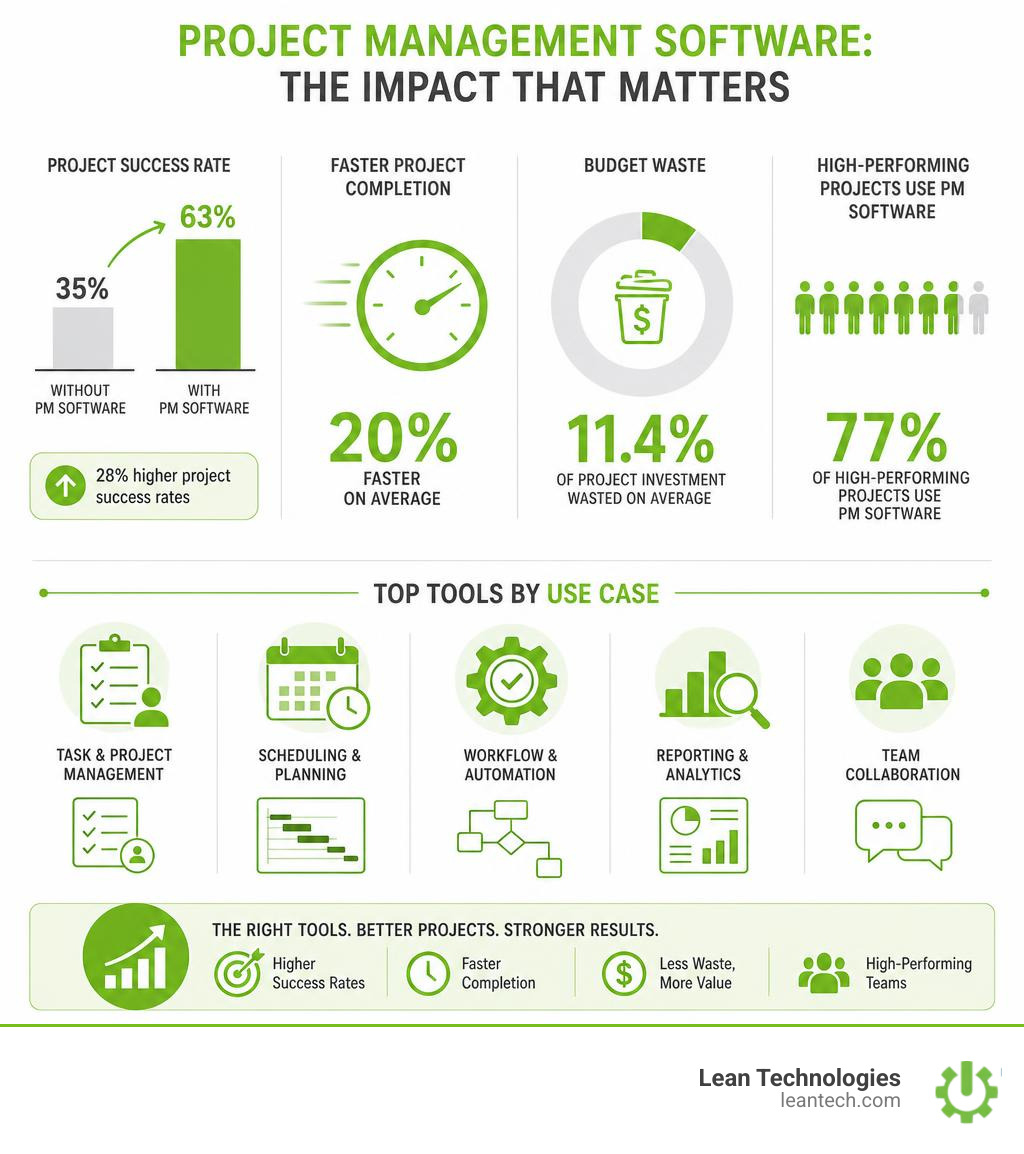
Only 35% of projects are considered successful by their organizations
Companies waste an average of 11.4% of their project investment due to poor project performance
Teams using project management tools complete projects 20% faster on average
Organizations using PM software report 28% higher project success rates
If you're managing a busy plant, those numbers hit differently. Every delayed decision, every miscommunication between shifts, every hour spent hunting down status updates — that's money walking out the door.
The good news? 77% of high-performing projects use project management software. The gap between a chaotic shop floor and a well-run operation often comes down to one thing: whether your team has the right tools to capture, track, and act on information in real time.
This guide cuts through the noise. Whether you're evaluating your first platform or replacing a system that's outgrown your team, you'll find clear, practical answers — no fluff, no vendor spin.
Quick answer — here's what the top project management software categories look like in 2026:
Software Category Best For Key Focus Ideal Team Size Lightweight Kanban Simple task tracking Visual boards, low complexity 1 - 15 users All-in-One Work Management Cross-functional collaboration Customization, templates 10 - 500+ users Agile & Technical Platforms Software & technical workflows Sprint tracking, bug tracking 10 - 10,000+ users Enterprise Portfolio Systems Complex waterfall scheduling Advanced Gantt, deep reporting 100+ users
But here's the thing — the best tool isn't the most popular one. It's the one that fits how your team actually works. For manufacturers especially, that means looking beyond task lists and asking: does this platform support shop floor workflows, real-time visibility, and continuous improvement — or does it just move your paper problem to a screen?
That's exactly what this guide is built to answer.
Why Spreadsheets are Killing Your Shop Floor Productivity
Walk into almost any manufacturing facility, and you’ll find them: Excel spreadsheets tracking preventative maintenance schedules, shift handovers, and continuous improvement projects. They are cheap, familiar, and incredibly dangerous to operational efficiency.
When teams rely on spreadsheets, they are forced into constant context switching. An operations manager has to jump between five different files just to see if a critical repair was completed. The quality engineer has to manually copy data from a paper sheet into a tracking spreadsheet at the end of the day. This manual entry is slow, prone to errors, and creates massive data silos.

Worse yet, spreadsheets lack accountability. There is no easy way to assign a task, set a hard deadline with automatic reminders, or see who made the last change without digging through version histories. When files are stored on local hard drives or buried in shared network folders, communication gaps widen.
By switching to dedicated Project Tracking systems, teams centralize their communication, automate task reminders, and eliminate the manual data entry that drains hours from every shift.
The Real Cost of "Real-Late" Data
The biggest issue with spreadsheets and paper-based tracking is that they are inherently retrospective. If operators log a machine issue on a paper sheet, and that sheet isn't entered into a digital tracker until the end of the shift or the end of the week, that data is "real-late."
Real-late data means delayed decisions. If a machine was running out of spec at 9:00 AM, but the supervisor doesn't see the consolidated report until 5:00 PM, an entire shift's worth of scrap has already been produced.
To run a truly lean operation, teams must manage active Projects with real-time visibility. When data is captured directly at the source—on a tablet or mobile device at the workstation—supervisors can spot roadblocks instantly, adjust resource allocation on the fly, and prevent minor issues from snowballing into expensive downtime.
Core Features of Modern Project Management Software
To move away from manual workarounds, it helps to understand the core features that drive modern project management software. These platforms are no longer just digital to-do lists; they are highly visual engines designed to coordinate complex work.
Gantt Charts (Timeline Views): Ideal for planning multi-phase projects with strict dependencies. For example, if a production line setup is delayed, a Gantt chart automatically shifts all subsequent testing and launch tasks, showing the immediate impact on the final deadline.
Kanban Boards: Perfect for day-to-day task execution. Tasks are represented as cards that move through columns (e.g., "To Do," "In Progress," "Under Review," "Done"). It provides an instant visual overview of work status.
Resource Scheduling: Helps managers see who is working on what. This prevents burnout and ensures that critical personnel—like highly specialized maintenance technicians—are not over-allocated across multiple projects.
For those looking to transition to visual workflows, implementing a digital Kanban Board Tool is often the fastest way to align teams. To understand how these features fit into a broader operational strategy, refer to this Introduction to Lean Project Management.
Native Time Tracking and Financial Tools
For professional service agencies, creative firms, and engineering teams, tracking where every minute goes is critical to maintaining profitability. Some project management software options build these capabilities directly into their platform.
For example, specialized operational tools offer automated desktop time tracking that records activities locally without intrusive screenshots, giving users full control over what they log. This feeds directly into automated timesheets and invoicing integrations, allowing teams to bill clients instantly for completed milestones.
Conversely, many general-purpose task managers lack robust, built-in financial and billing features, requiring teams to integrate third-party apps to handle invoicing. When selecting a platform, teams must decide if they need a pure task manager or an end-to-end operational tool that handles everything from planning to payment.
Tailoring Project Management Software to Manufacturing Workflows
While standard PM tools work well for marketing campaigns and software sprints, a manufacturing shop floor has unique demands. Software built for office workers often fails when introduced to operators and maintenance technicians.
On the shop floor, project management must align directly with physical processes. This is where Workflow Tracking becomes vital. Instead of tracking abstract "tasks," manufacturing teams need to track:
Standard operating procedure (SOP) compliance
Rapid problem-solving cycles (like Kaizen events or 5S audits)
Equipment downtime and maintenance work orders
Shift handover logs and safety incidents
If a tool is too complex or requires typing out long descriptions on a keyboard, shop floor adoption will plummet. The interface must be simple enough for an operator to log an issue on a tablet in three taps, ensuring that continuous improvement actions are captured in real time.
How to Choose the Right Platform for Your Team Size and Industry
With hundreds of tools on the market in 2026, finding the right fit requires looking at your team's size, project complexity, and industry-specific constraints.
For instance, software development teams almost universally lean toward specialized agile platforms because of their deep support for sprints and bug-tracking workflows. Creative agencies often choose tools with built-in proofing and time-tracking capabilities. Non-technical teams and marketing departments frequently adopt highly visual work management platforms due to their colorful, intuitive interfaces.
Here is a quick breakdown of how different platform types align with organizational needs:
Software Category Target Team Size Primary Use Case Key Strengths Potential Drawbacks Lightweight Kanban 1 - 15 users Simple task tracking, personal projects Low learning curve, highly visual Lacks advanced reporting and resource planning All-in-One Work Management 10 - 500+ users Cross-functional collaboration, marketing, operations Highly customizable, rich template libraries Can feel overwhelming; pricing plans can be complex Agile & Technical 10 - 10,000+ users Software development, IT service management Deep developer integrations, sprint tracking Steep learning curve for non-technical users Enterprise Portfolio 100+ users Complex waterfall scheduling, corporate portfolio reporting Robust data processing, advanced Gantt controls Expensive; long implementation and training times
Evaluating Free Project Management Software Options
For small businesses, startups, or individual departments, starting with a free plan is a great way to test a tool's viability without financial risk. However, "free" rarely means unlimited.
Most free plans come with strict limitations, such as:
User Caps: Many platforms limit their free tiers to just 2 or 3 users, while some lightweight tools allow up to 10 collaborators per workspace.
Feature Restrictions: Free tiers often lock away critical views like Gantt charts, advanced automations, and detailed reporting dashboards.
Storage Limits: Free plans typically limit storage to a few gigabytes, which can quickly fill up if your team uploads images or documents.
To avoid hitting a wall three months into implementation, teams should consult a structured Guide to Software Evaluation Criteria to map their long-term feature requirements against free-tier limitations.
Enterprise-Grade Security and Compliance
For larger organizations and highly regulated industries like aerospace, medical devices, and defense manufacturing, security is not optional. You cannot store sensitive operational data or intellectual property in a tool that lacks robust protection.
When evaluating enterprise-grade software, look for:
SOC2 Type II Certification: Ensures the vendor has independent audits verifying their data security, availability, and confidentiality practices.
ISO 27001 Certification: The international standard for managing information security risks.
Data Governance & Permissions: The ability to restrict access so that users only see the projects and data relevant to their roles.
Before committing to a cloud-based platform, verify that their infrastructure aligns with the ISO/IEC 27001 Security Standards to keep your critical business data protected.
Implementing New Systems Without the Shop Floor Friction
The biggest threat to any new software rollout isn't the technology—it's user adoption. If your team finds the new system too complicated, they will quietly abandon it and return to their old paper forms and Excel workarounds.
To build lasting adoption, the implementation process must focus on the frontline user. This means moving away from top-down mandates and instead involving operators, supervisors, and technicians in the selection process.

A highly effective strategy is to deploy digital Performance Goal Boards in common areas. When teams can see their daily targets, active problem-solving tasks, and continuous improvement ideas updated in real time on a shared screen, it fosters a culture of transparency and accountability.
Overcoming the Learning Curve
To ensure a smooth transition, avoid trying to roll out every feature at once. Start with a simple, high-impact use case—such as tracking maintenance work orders or shift-handover notes—and master it before expanding.
Run Hands-On Pilots: Test the software with a single team or production line for two weeks. Gather feedback, adjust the layouts, and address pain points before scaling.
Use Pre-Built Templates: Don't start with a blank screen. Customize existing industry templates to match your team’s terminology.
Simplify the Interface: Hide advanced fields, complex sidebars, and unnecessary buttons. The cleaner the interface, the faster your team will adopt it.
Frequently Asked Questions about PM Tools
What is the best free project management software for small teams?
The "best" free tool depends on your team's workflow. For simple, visual task tracking, lightweight Kanban boards offer incredibly user-friendly interfaces with support for small groups of collaborators. If your team requires highly structured task hierarchies and extensive customization, look for all-in-one work management platforms that offer generous free tiers. For small technical teams, specialized agile planning tools often provide free plans supporting up to 10 users with robust sprint tracking.
How does project management software improve manufacturing efficiency?
Project management tools improve efficiency by eliminating communication lag and administrative waste. Instead of waiting for weekly meetings or shift handovers to identify bottlenecks, supervisors get real-time visibility into active tasks. It automates repetitive follow-ups, ensures preventative maintenance is executed on schedule, and creates a clear, searchable record of historical problems and solutions.
Can we integrate project management tools with our existing ERP?
Yes, most modern, cloud-based project management tools offer open APIs and pre-built connectors to integrate with Enterprise Resource Planning (ERP) and Manufacturing Execution Systems (MES). This allows teams to sync high-level project milestones with inventory levels, production schedules, and financial data without manual double-entry.
Actionable Next Steps for Lean Operations
Stop managing your shop floor through spreadsheets and wishful thinking. While general-purpose project management software can help organize office tasks, a busy manufacturing plant needs a system built for the realities of the shop floor.
This is where Lean Technologies steps in.
Our platform, Thrive, is an all-in-one, customizable shopfloor software developed by manufacturing experts specifically to streamline operations, boost productivity, and improve profit. Thrive doesn't try to replace your ERP or MES. Instead, it acts as a flexible digital toolbox that helps operators and supervisors log issues, track actions, and drive continuous improvement in real time.
If you are ready to eliminate paper-based workarounds, drive frontline accountability, and gain true real-time visibility into your operations, it is time to take the next step.





