

Mastering HR database management for happier and more compliant teams
Why HR database management is costing manufacturers more than they think
HR database management is the structured process of collecting, storing, organizing, and using employee data across the full workforce lifecycle — from hiring to offboarding. For manufacturing operations, it's the difference between having reliable workforce data at your fingertips and drowning in paper files, mismatched spreadsheets, and compliance gaps.
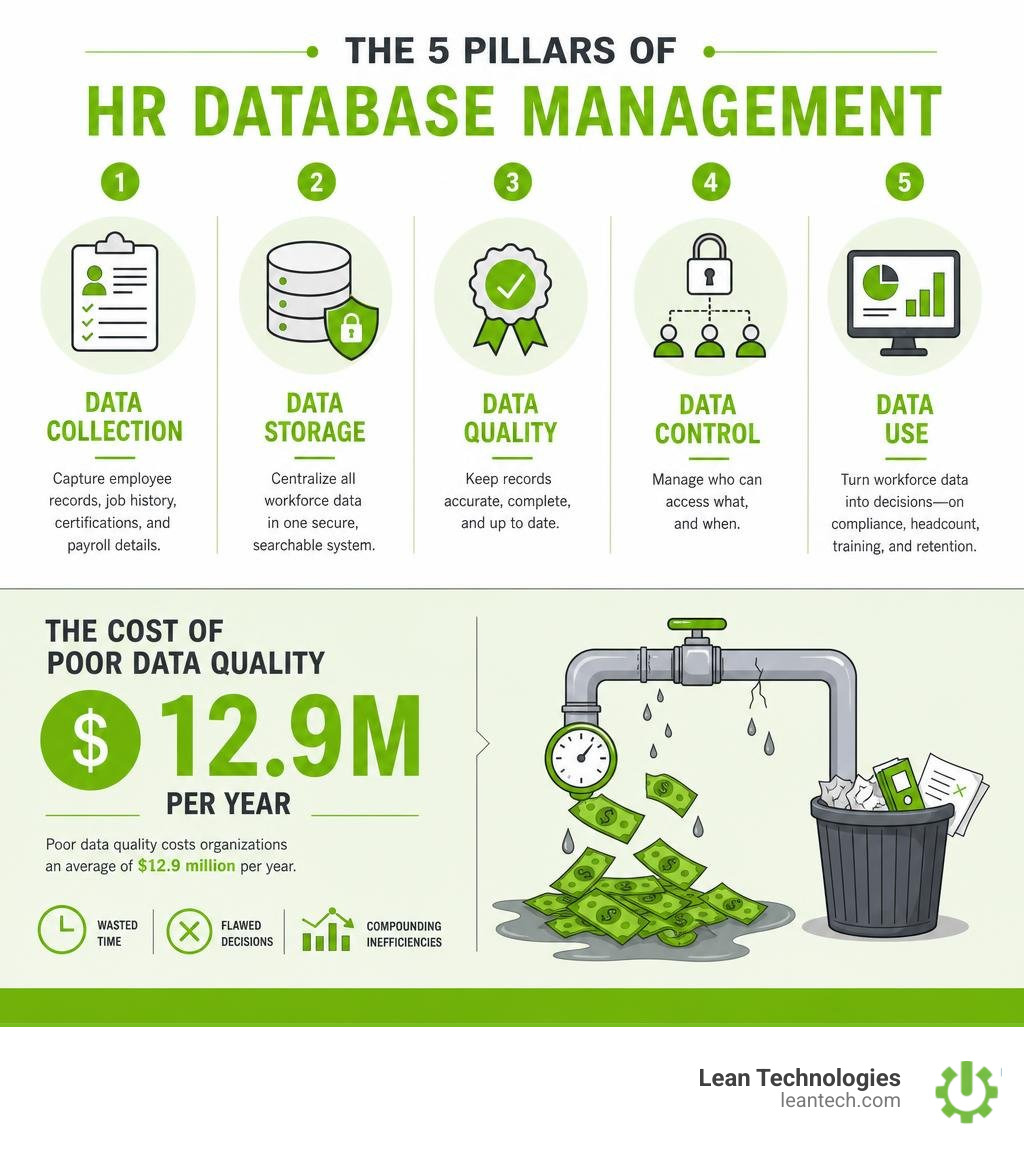
Here's what effective HR database management covers at a glance:
Area What It Means Data collection Capturing employee records, job history, certifications, and payroll details Data storage Centralizing all workforce data in one secure, searchable system Data quality Keeping records accurate, complete, and up to date Data control Managing who can access what, and when Data use Turning workforce data into decisions — on compliance, headcount, training, and retention
On a busy shop floor, HR data problems don't stay in the HR office. They show up as compliance failures during audits, payroll errors that frustrate workers, and training gaps that create safety risks. When employee records live in a mix of paper files, shared drives, and disconnected spreadsheets, nobody has the full picture — and that costs real money.
According to Gartner research, poor data quality costs organizations an average of $12.9 million per year. That figure reflects wasted time, flawed decisions, and the compounding inefficiencies that come from working off unreliable information. For a manufacturer managing dozens or hundreds of workers across shifts, the damage shows up fast.
The good news? Getting HR data under control doesn't require a massive IT project. It requires the right structure, clear ownership, and tools that fit how your team actually works.
The core pillars of modern hr database management
To build a reliable data foundation, you need to look beyond the technology. A database is only as good as the rules governing it. According to the industry experts at AIHR, effective hr database management rests on three key pillars: Quality, Control, and Use.
Quality: Your data must be accurate, complete, and up to date. If your headcount numbers don't match your active payroll, or if forklift certifications expired six months ago without anyone noticing, your data quality is broken.
Control: You must establish clear rules about who can access, edit, and delete records. This is especially critical on the shop floor, where shift supervisors, HR managers, and plant directors all need different levels of visibility.
Use: Having clean data is useless if it sits in a digital vault. Modern databases must actively feed reports, dashboards, and daily operational decisions.
By storing all employee records in a central, digital location, companies can move away from scattered paperwork and transition to streamlined Employee Documentation. This transition ensures that critical workforce metrics are always accessible to the leaders who need them.

Core data elements for workforce tracking
To support effective workforce management, an HR database must go beyond basic contact information. To build a complete picture of your team, a comprehensive database should track several core data categories:
Identity and personal details: Legal names, tax identifiers, emergency contacts, and contact information.
Employment and job history: Job titles, department assignments, reporting lines, work locations, and contract history.
Compensation and payroll details: Wage rates, salary history, bank details, and benefits selections.
Skills and qualifications: Certifications, licenses, training records, and specialized skill sets.
Time, attendance, and leave: Shift patterns, hours worked, and absenteeism.
For growing teams, keeping track of these elements in a structured profile prevents operational errors. A structured digital system allows businesses to store contracts, IDs, and certifications directly on individual employee profiles, ensuring that no critical records are lost in shared drives.
Furthermore, robust enterprise platforms offer a single, global person record that manages multiple legal entities and contractual agreements. This level of detail is essential for complex operations that need to track seniority processing, collective bargaining agreements, and automatic pay grade progressions.
Why traditional spreadsheets fail at hr database management
For many small to midsize manufacturers, Excel is the default HR tool. It is cheap, familiar, and easy to set up. But as your team grows, managing workforce records in spreadsheets becomes a major liability.
First, spreadsheets lack version control. When multiple supervisors update different copies of a "Shift Schedule" or "Training Log" on their local desktops, you end up with fragmented data. Second, manual data entry is highly prone to human error. A single typo in a wage rate or an incorrect date on a safety certification can lead to payroll disputes or compliance fines.
Finally, spreadsheets pose severe security risks. They are rarely encrypted, and they do not support role-based access controls. If an Excel file containing sensitive payroll data or personal addresses is emailed to the wrong person, it can result in a serious data breach. Moving to a dedicated digital system allows you to implement secure, automated processes like digital Time Off Tracking, eliminating the administrative chaos of paper forms and local spreadsheets.
How structured HR data drives operational efficiency and compliance
When your workforce data is structured and centralized, HR ceases to be a purely administrative bottleneck. It becomes a strategic asset that keeps your shop floor running smoothly.

Streamlining audits and regulatory compliance
For manufacturers, compliance isn't optional. Between OSHA safety standards, wage-and-hour laws, and strict regional privacy regulations like GDPR and PDPA, the administrative burden is heavy.
If an auditor walks onto your shop floor today and asks to see the training certifications for your crane operators, how long will it take you to find them? If you are digging through physical filing cabinets or searching through nested folders on Google Drive, you are at risk.
With a structured database, compliance is built into your daily operations. A structured database allows you to set up custom tables and fields to track expiration dates for licenses, physical exams, and safety credentials. Similarly, dedicated tracking systems provide automated alerts and renewal reminders for work visas and certifications, helping companies maintain compliance across multiple facilities.
By centralizing your data, you can easily implement robust Training Program Tracking, ensuring your team is fully certified and audit-ready at a moment's notice.
Empowering teams through self-service portals
One of the fastest ways to reduce the administrative burden on your HR team is to hand control back to your employees. Modern HR database software achieves this through employee self-service (ESS) portals.
Instead of having an operator walk to the HR office to request a copy of their payslip, update their emergency contact, or submit a PTO request, they can do it themselves via a mobile app or a tablet on the shop floor.
Self-service portals empower employees to manage their personal details, view company policies, and track their leave balances independently. This reduces manual data entry errors for HR, minimizes shift-disrupting administrative interruptions, and ensures that employee records are updated in real time.
Overcoming the biggest HR data challenges on the shop floor
Managing workforce data in a manufacturing environment comes with its own unique set of obstacles. The nature of shift work means that administrative tasks often take a back seat to production targets.
Tracking Method Data Access Compliance Risk Security Level Admin Burden Paper & Spreadsheets Scattered, delayed, hard to search High (expired certs, lost records) Low (no encryption or access logs) High (constant manual entry) Cloud HR Database Centralized, real-time, mobile-friendly Low (automated alerts, audit trails) High (AES-256 encryption, role-based controls) Low (automated workflows, self-service)
Breaking down data silos between HR and operations
A common pain point for plant managers is the disconnect between the HR office and the production floor. When the recruitment system, payroll software, and shopfloor scheduling tools don't talk to each other, data silos form.
For example, a new hire might be cleared to work by HR, but because the scheduling system hasn't synced, the shift supervisor doesn't see them on the active roster. Or worse, an operator's safety certification is revoked in the training database, but they are still assigned to a hazardous machine on the shop floor because the scheduling tool is disconnected.
To solve this, modern databases rely on open APIs and native integrations. Your core workforce database must integrate seamlessly with your operational tools. This ensures that when a change is made in your system of record, it instantly reflects across your scheduling, payroll, and safety systems, giving you true real-time visibility.
Maintaining data quality and security
HR databases store some of the most sensitive information in your business, including Social Security numbers, bank routing codes, medical histories, and wage details. Protecting this data is both a legal obligation and a cultural necessity.
To secure your workforce records, your database should utilize enterprise-grade security protocols:
Role-based access control (RBAC): Ensure that access follows responsibility, not just seniority. A shift supervisor should only see their team's training records and schedules, while employees should only see their own personal profiles. Only core HR administrators should have access to sensitive compensation details.
AES-256 encryption: Ensure that all employee data is encrypted both at rest (while stored in the database) and in transit (while being sent across the network).
Audit trails: Maintain a permanent, tamper-proof digital log of who viewed, edited, or deleted any record. This is a crucial requirement for regulatory audits.
Using professional digital tools allows companies to transition from vulnerable files to secure, structured cloud-based databases that keep compliance data, disciplinary actions, and contract documents safely locked down.
Build vs. Buy: Selecting your HR data infrastructure
When it comes to upgrading your hr database management infrastructure, organizations generally face a critical decision: should they build a custom database from scratch, or buy off-the-shelf software?
Custom database development using SQL
For companies with highly specific workflows or dedicated IT resources, building a custom relational database using SQL might seem appealing.
Using SQL allows your development team to design a highly tailored database schema with custom tables, unique relationships, and precise data validation rules. Learners who want to understand how these systems are structured from the ground up often start with educational resources like the Great Learning HR Database Course, which teaches basic SQL queries, data manipulation, and schema design.
However, building a custom database carries significant drawbacks for most businesses:
High technical overhead: You need dedicated database administrators to design, test, and deploy the system.
Ongoing maintenance costs: Security patches, server upgrades, and database optimization must be handled entirely by your internal IT team.
Lack of user-friendly interfaces: Custom SQL databases require a custom-built front-end application so that non-technical HR managers and operators can actually use the system without writing code.
How to choose the right software for hr database management
For the vast majority of organizations, buying dedicated HR database software is the faster, more cost-effective, and highly scalable route. Modern cloud-based software offers instant deployment, automated backups, and bank-grade security without the technical headache.
When evaluating software vendors, keep these key criteria in mind:
Shop floor usability: Is the interface simple enough for operators and supervisors to navigate on a mobile device or tablet during a busy shift?
API integrations: Can the software connect with your existing payroll, ERP, and time-tracking tools?
Extensibility: Can you easily add custom fields, tables, and document templates without needing IT support?
Security and compliance: Does the vendor offer role-based permissions, AES-256 encryption, and audit-ready reporting?
Frequently Asked Questions about HR databases
What is the difference between an HR database and an HRIS?
An HR database is the underlying digital repository where employee records, documents, and workforce data are stored and organized. An HRIS (Human Resources Information System) or HRMS (Human Resources Management System) is the broader software suite that built on top of that database, providing user interfaces, automated workflows, reporting modules, and self-service portals to help HR teams manage everyday processes.
How do you ensure data security in an HR database?
To ensure data security, you should implement role-based access controls (RBAC) so users only see the data required for their roles. Additionally, ensure the software encrypts data both at rest and in transit using AES-256 standards, maintains automated backups, and logs all user actions in a secure audit trail.
Can employees update their own information in the database?
Yes. Modern HR database software includes employee self-service (ESS) portals. This allows employees to log in securely to update their contact information, emergency contacts, and direct deposit details, which reduces administrative work for HR while keeping records accurate.
In summary
At the end of the day, managing your workforce shouldn't feel like a constant battle against paperwork and broken spreadsheets. When your HR data is structured, secure, and accessible, your entire operation runs smoother. Your supervisors spend less time chasing down certifications, your HR team spends less time fixing payroll errors, and your business stays fully compliant and audit-ready.
If you are ready to stop managing your shop floor through spreadsheets and wishful thinking, it's time to digitize your processes. Discover how Thrive HR can help you centralize your workforce data, streamline training compliance, and give your team the real-time visibility they need to run lean. Let your team run lean — with real-time visibility and fewer workarounds.





