
Stop Losing Sticky Notes with These Kanban Software Solutions
Your Sticky Notes Are Lying to You—Here's What to Use Instead
Kanban system software gives teams a live, digital view of every task moving through their workflow—so nothing falls through the cracks between shifts, departments, or spreadsheets.
If you're short on time, here's what you need to know:
Top Kanban Software Types at a Glance (2026)
Software Type Best For Key Feature Simple Team Boards Office and project teams Drag-and-drop cards, templates Manufacturing E-Kanban Supply chain and inventory ERP/WMS integration, replenishment signals Shopfloor Action Boards Operators and supervisors Mobile capture, shift handoffs Enterprise Portfolio Kanban Multi-site operations Cross-team visibility, OKRs Developer Kanban Engineering teams Git workflows, issue tracking Self-Hosted Boards IT-controlled environments Docker, open-source, data privacy Chat-Based Kanban Remote or office teams Slack, Teams, Gmail integration AI-Assisted Kanban CI and knowledge teams Smart suggestions, auto-descriptions Maintenance and Work Order Boards Maintenance teams PM queues, technician assignments
Here's a situation that plays out on shop floors every day: a supervisor writes a corrective action on a sticky note, sticks it to the production board, and by the next shift it's gone—knocked off, thrown away, or buried under a stack of paper forms. Nobody followed up. The problem came back.
That's not a people problem. That's a system problem.
Physical Kanban boards and paper cards were a idea when Toyota developed them in the 1940s. The concept was simple—use visual signals to pull work through a process only when it's needed. It worked well on a factory floor where everyone could see the same board at the same time.
But manufacturing in 2026 looks different. Teams work across shifts. Plants span multiple buildings or sites. Supervisors need to see what's happening on Line 3 right now, not after someone walks the floor and updates a spreadsheet at the end of the day. By then, it's already too late.
Digital Kanban tools solve this by turning those physical cards and columns into a live, shared system that anyone on the team can update—from a tablet on the floor, a desktop in the office, or a phone between shifts. Tasks have owners. Blockers are visible. Nothing disappears.
The challenge is that "Kanban software" covers a lot of ground in 2026. There are lightweight task boards for small teams, enterprise platforms connecting strategy to execution, open-source tools for IT teams that want full data control, and specialized manufacturing systems managing millions of inventory orders per month. Choosing the wrong one means you've just digitized your sticky note problem instead of solving it.
This guide breaks down nine categories of Kanban system software—so your team can pick the right tool, roll it out without creating another workaround, and actually close the loop on the work that matters.
What Kanban Software Is—and Why It Beats Traditional Project Management Tools
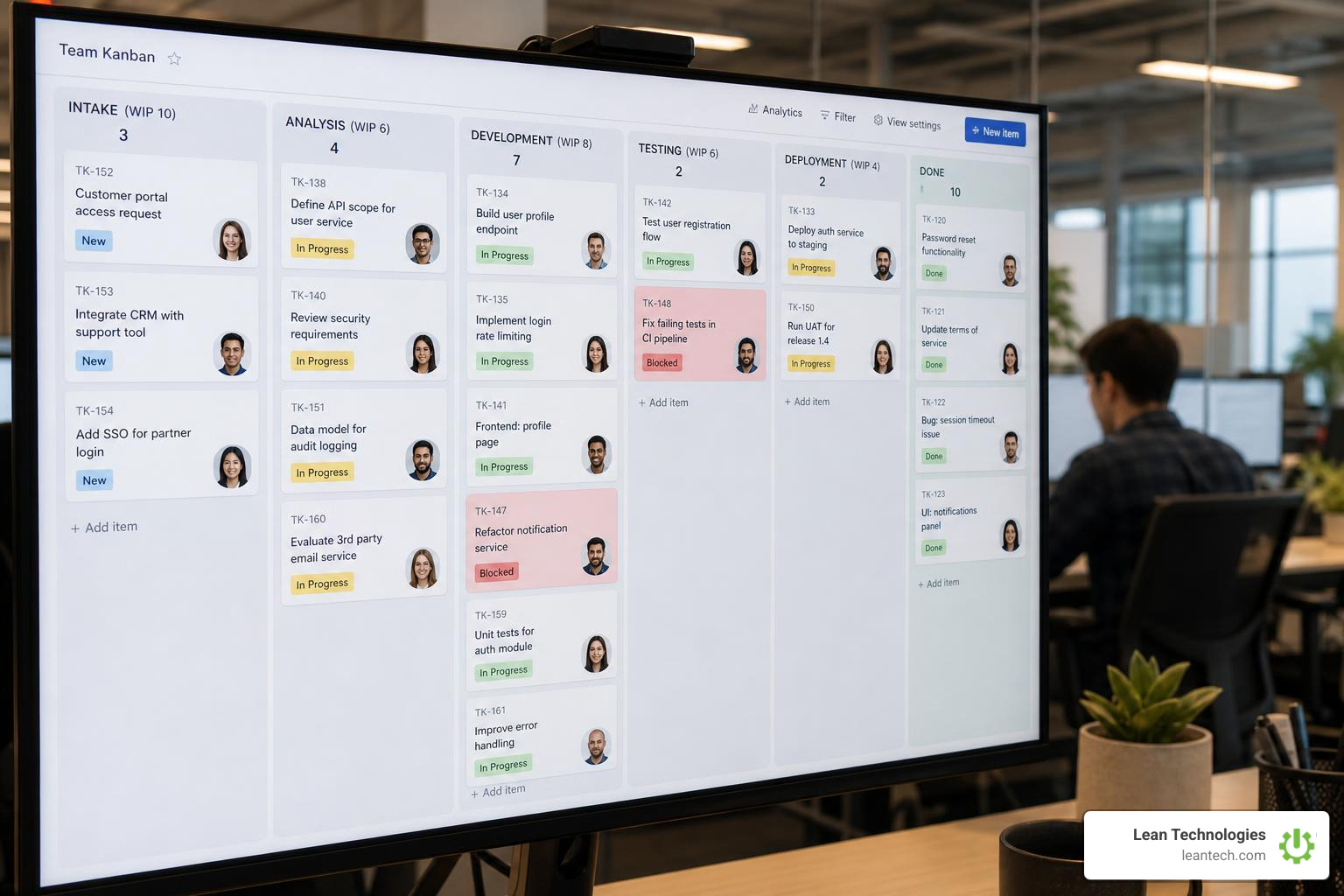
At its core, kanban system software is a visual representation of work. It takes your physical board and moves it to the cloud. Instead of checking in with five different people to see where a project stands, you look at a digital board.
Every task is represented by a card. Every stage of your process is represented by a column. As work progresses, cards move from left to right.
But a true Kanban Board Tool is much more than a digital to-do list. It is a pull-based management system. Instead of pushing work onto operators when they are already overwhelmed, tasks are pulled into the "In Progress" column only when there is capacity. This is managed through Work-in-Progress (WIP) limits—a hard cap on the number of tasks allowed in any single column at one time. If your "Code Review" or "Quality Inspection" column has a WIP limit of two, you cannot drag a third card into it until one of the active tasks is moved to "Done."
This forces your team to stop starting new things and start finishing what is already on the board. It is the digital evolution of Lean manufacturing, built to expose bottlenecks instantly.
It is also important to understand what Kanban software is not. It is not an ERP (Enterprise Resource Planning) or an MES (Manufacturing Execution System). It doesn't run your payroll, and it doesn't track machine PLCs. Instead, it organizes the human actions, safety issues, and continuous improvement tasks that keep your facility running.
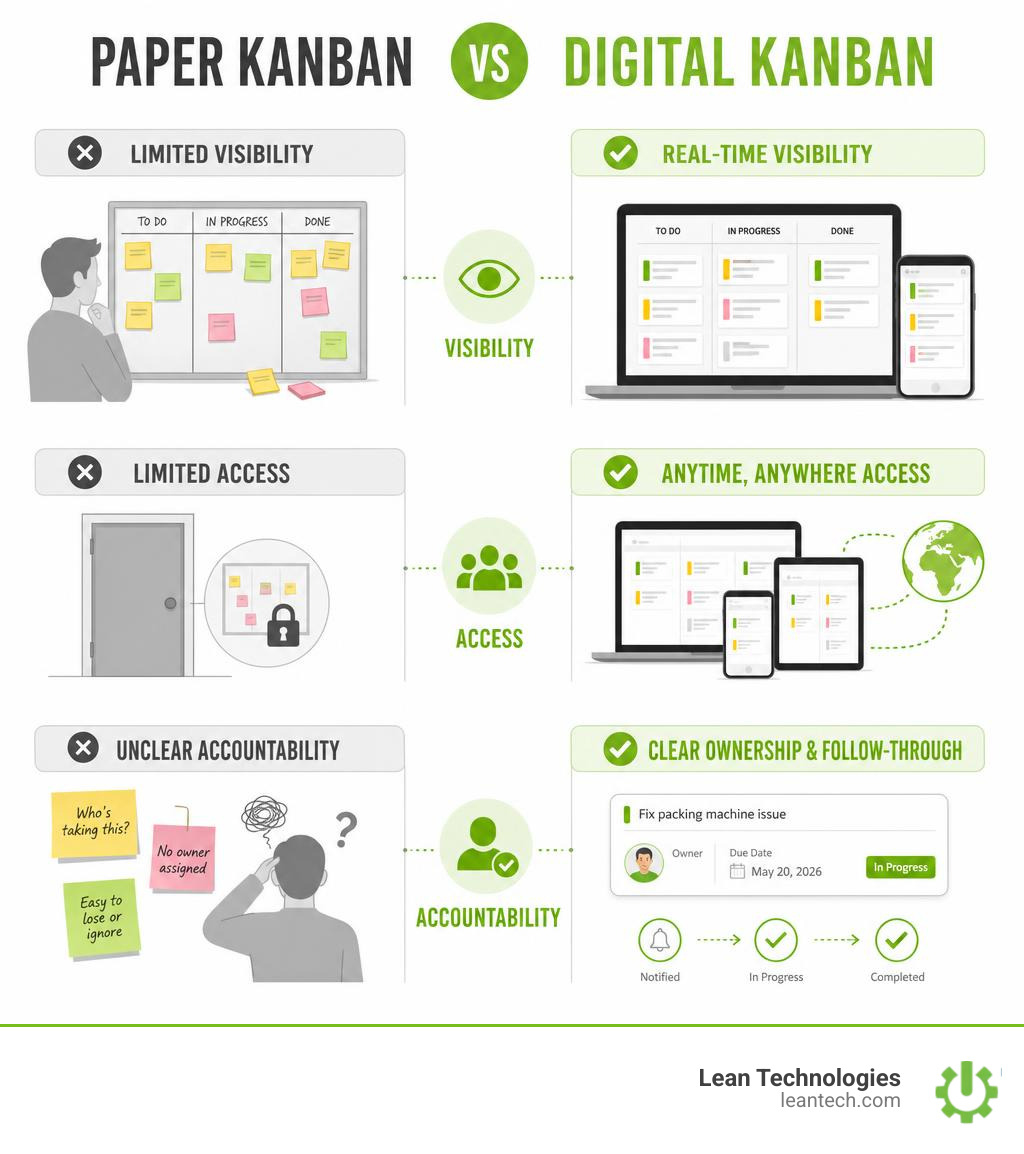
Digital Kanban vs. Paper Boards
Physical boards are great—until someone drops a card, writes with illegible handwriting, or works from a different building. Paper boards have zero memory. Once a card is thrown away, its history is gone.
Digital Kanban systems solve this by keeping a permanent audit trail. Every time a card moves, is assigned, or gets updated, the software logs it. Operators can attach photos of machine defects directly to a card from a tablet, type comments, set firm due dates, and tag supervisors for help. Best of all, anyone can access the board from anywhere—whether they are on the shop floor or working remotely.
Kanban vs. Traditional Project Management
Traditional project management software relies heavily on Gantt charts, rigid sprint planning, and massive task queues. These tools assume you can predict exactly how a project will unfold over six months.
Kanban takes the opposite approach. It focuses on continuous flow and real-time flexibility. Instead of locking teams into rigid, two-week cycles, Kanban lets you adapt to changes on the fly. If a critical machine goes down today, you reprioritize the backlog instantly. It is lightweight, intuitive, and gives operators and supervisors the autonomy to manage their daily work without getting bogged down in complex administrative software.
Benefits for Shopfloor and Operations Teams
On a busy shop floor, communication gaps waste time and money. Digital Kanban tools eliminate these gaps by streamlining handoffs between shifts. When the morning shift supervisor logs a maintenance issue, the afternoon shift sees it instantly on the active board.
By enforcing WIP limits, operations managers can prevent bottlenecks before they stall production. This leads to shorter cycle times, less waste, and clearer task ownership. When everyone knows exactly what they are responsible for, accountability goes up, and continuous improvement (CI) initiatives actually get completed instead of dying on a forgotten white board.
9 Kanban System Software Solutions That Replace Sticky Notes in 2026
The software market in 2026 is crowded. That does not mean every tool fits a plant floor.
Some Kanban systems are built for office task lists. Some are built for material replenishment. Some are built for IT teams that want full control over hosting. Others are built for operators, supervisors, maintenance teams, quality teams, and CI leaders who need action tracking at the source.
The key is simple: match the software type to the work being managed. A production issue, a safety finding, a PM task, and an engineering backlog should not all be forced through the same generic workflow.
For a neutral overview of the Kanban method itself, see the Lean Enterprise Institute explanation of Kanban.
1. Simple Team Board Software
Simple team board software is the easiest starting point for teams moving away from sticky notes, whiteboards, and scattered task lists.
These tools usually focus on:
Drag-and-drop cards
Basic columns like "To Do," "Doing," and "Done"
Checklists
Labels
Comments
Due dates
Templates
They work well for office teams, project coordinators, HR task tracking, and small internal projects where the workflow is simple.
The downside? Most simple boards are not built for the shop floor. They can organize tasks, but they often lack the structure operators and supervisors need for shift handoffs, downtime actions, safety findings, quality issues, and accountable follow-up.
2. Manufacturing E-Kanban Software
Manufacturing environments with complex supply chains require more than basic task tracking. They need electronic Kanban systems designed to manage physical inventory, material replenishment, and supplier loops.
E-Kanban software is typically used to manage:
Inventory signals
Replenishment requests
Supplier communication
Min-max levels
ERP or WMS data handoffs
Barcode, RFID, or scan-based material movement
This type of system helps prevent material shortages, reduce excess stock, and keep pull-based flow moving.
It is important to separate this from shopfloor action tracking. E-Kanban manages material flow. Shopfloor action boards manage human follow-up. A plant may need both, but they solve different problems.
3. Shopfloor Action-Tracking Boards
For operations managers, continuous improvement coordinators, and supervisors, task tracking must happen at the source. Shopfloor action boards are designed for high-frequency, real-time data entry on tablets and mobile devices.
Thrive: Developed by manufacturing experts, Thrive is an all-in-one, customizable shopfloor software platform designed to streamline operations, boost productivity, and improve profit. Instead of trying to force a generic office tool onto a rugged factory floor, Thrive acts as a visual command center. Operators use tablets right at their workstations to log machine downtime, flag safety hazards, and track quality defects.
Supervisors can immediately view active issues, assign corrective actions, and track progress during shift huddles. Because data is entered at the source in real time, teams gain instant visibility without waiting for end-of-week spreadsheet updates. It bridges the gap between operators and managers by providing structured Workflow Tracking and accountable Project Tracking.
4. Enterprise Portfolio Kanban
Enterprise portfolio Kanban is built for organizations that need visibility across multiple teams, departments, plants, or business units.
This type of software helps leadership connect strategy to execution by showing how daily work supports larger priorities.
Common features include:
Multi-board rollups
Portfolio views
OKR or initiative tracking
Executive dashboards
Advanced permissions
Compliance reporting
Cross-site visibility
Enterprise portfolio Kanban is a good fit when the challenge is alignment across a large organization.
For small and midsize manufacturers, the risk is overbuying. If the real problem is that supervisors cannot see open actions from yesterday's shift, a heavy portfolio system may add complexity instead of solving the floor-level problem.
5. Developer and Engineering Kanban
Software engineering and product development teams have unique workflows. Their Kanban boards often need to connect with code repositories, issue tracking, pull requests, and release planning.
Developer-focused Kanban tools usually support:
Technical backlogs
Code review stages
Bug tracking
Release queues
Git-based workflows
Engineering documentation
Audit history for technical changes
These tools are useful for IT and engineering teams, but they are usually not the right fit for operators logging a safety issue or a maintenance tech updating a work order from the floor.
The lesson: pick the board for the work. A great engineering workflow can still be a poor production workflow.
6. Self-Hosted Kanban Boards
For organizations with strict data privacy policies, regulatory requirements, or IT departments that demand complete control over infrastructure, self-hosted Kanban boards can be a strong option.
These systems are usually installed on private servers or internal cloud environments. They often appeal to IT teams that want to control:
Hosting
Backups
Security settings
User access
Data retention
Internal integrations
Self-hosted boards can work well when technical ownership is strong.
But there is a tradeoff. The plant still needs adoption. If the interface is clunky, mobile access is weak, or operators have to jump through too many steps to log an issue, the team will go right back to paper.
7. Email and Chat-Based Kanban
Some teams live inside email, chat, and shared inboxes. For them, switching between messages and a separate project board creates friction.
Email and chat-based Kanban tools bring task management closer to where communication already happens.
Common use cases include:
Turning emails into cards
Creating tasks from chat messages
Sending board updates into team channels
Assigning follow-ups without leaving the conversation
Reducing context switching for office teams
These tools can help remote teams, admin groups, and support functions stay organized.
On the shop floor, they are usually not enough by themselves. Production, maintenance, quality, and safety teams need structured fields, clear statuses, mobile capture, and source-level data entry. A chat message is not a reliable system of record for a machine issue, audit finding, or corrective action.
8. AI-Assisted Kanban
AI is changing how teams manage workflows, especially around admin work.
AI-assisted Kanban can help with:
Drafting task descriptions
Summarizing long comment threads
Suggesting subtasks
Flagging overdue or high-risk work
Recommending workflow improvements
Helping teams clean up messy backlogs
For knowledge work, that can save time.
For manufacturing, AI needs guardrails. AI should support the process, not invent the process. A safety issue, quality defect, or downtime action still needs human review, clear ownership, and accurate source data.
If the information entered by the team is late, vague, or incomplete, AI will only summarize bad data faster.
9. Maintenance and Work Order Kanban
Maintenance departments struggle when work orders are managed in a giant, unorganized list. Maintenance-focused Kanban boards organize work orders by their operational status, making it easy to spot why jobs are stalled.
Work Order Status Boards: In a busy plant, a standard "To Do" list isn't enough. Maintenance managers need specialized statuses like "Planning," "Waiting for Parts," and "Ready to Schedule." Using a Kanban board to visualize these stages allows maintenance technicians to see exactly what equipment is down, what parts are pending, and who is assigned to the next PM (Preventive Maintenance) task. It prevents critical repairs from getting lost in a digital backlog.
Core Features That Separate High-Quality Kanban Tools From Digital Clutter
Not all digital boards are created equal. Some are nothing more than glorified spreadsheets that look like boards. To keep your shop floor or office team aligned, a high-quality Kanban tool must offer features that actively drive accountability and process improvement.
The Non-Negotiables
Any tool you select must include these foundational features:
Visual Work-in-Progress (WIP) Limits: The system must allow you to cap the number of active cards in a column to prevent team overload.
Clear Task Ownership: Every card must have a single assigned owner so there is no confusion about who is responsible for the next step.
Mobile and Tablet Accessibility: If operators or technicians have to walk to an office desktop to update a task, they won't do it. The software must run flawlessly on mobile devices and tablets at the workstation.
Robust Activity Logs: You must be able to see the complete history of a card—when it was created, who moved it, and what comments were added.
Analytics for Continuous Improvement
A great Kanban tool doesn't just track tasks; it provides the data you need to optimize your workflows. Look for platforms that offer:
Cycle Time and Lead Time Reports: Track exactly how long it takes for a task to go from "Started" to "Finished" (Cycle Time) and from "Created" to "Finished" (Lead Time).
Cumulative Flow Diagrams (CFD): Visualize the stability of your workflow and spot growing bottlenecks before they halt your operations.
Bottleneck Detection: Automatically highlight columns where cards are piling up or aging past their target completion dates.
To evaluate how well your current operational workflows support continuous improvement, consider taking a Lean Culture Assessment.
Integrations That Keep Work Moving
Your Kanban board shouldn't exist on an island. It needs to connect with the communication and data systems your team already uses. Enterprise-grade tools use open APIs, webhooks, and pre-built integrations to sync with Slack, Microsoft Teams, Gmail, and ERP systems. This ensures that when an operator logs a critical issue on the shop floor, the notification is instantly routed to the right channel, maintaining a single, accurate source of truth without manual double-entry.
For a deeper look at how to structure these digital connections across your facility, read our Guide to Digital Lean Manufacturing.
How to Choose and Roll Out Kanban Software Without Creating Another Workaround
The biggest risk of introducing new software is that your team ignores it and goes back to old spreadsheets, text threads, or paper notes.
That usually happens for one reason: the tool does not match the work.

Choose Kanban System Software by Team Size
Solo Users & Small Teams (1-10 users): Focus on lightweight tools with fast setup, simple boards, and minimal admin work. You need speed and clarity, not complex controls.
Midsize Manufacturers (50-500 users): Look for platforms like Thrive that are built for the shop floor. Operators need to learn the workflow quickly. Supervisors need structured tracking, shift handoffs, and accountability.
Enterprise Teams (500+ users across multiple sites): Prioritize advanced permissions, SSO, multi-site visibility, reporting layers, and compliance-friendly audit trails.
Choose Software by Department and Workflow
Production & Operations: Needs rugged, simple tablet interfaces to track machine downtime, material shortages, hourly output, and open actions.
Maintenance: Requires structured work order queues with statuses like "Waiting for Parts," "Ready to Schedule," and "Completed."
Quality & Safety: Needs quick photo uploads, clear owners, due dates, and instant alerts so supervisors can respond to defects or hazards fast.
Continuous Improvement (CI): Requires action-item tracking, visual metrics, and reliable data for daily huddles and follow-through.
Pilot, Standardize, Then Scale
Do not roll out a new software system to the whole plant on day one.
Start with a Pilot: Choose one workflow, such as maintenance work orders, safety findings, or one production line.
Map Your Real Process: Do not settle for generic "To Do, Doing, Done" columns. Use statuses that match the real work, such as "Logged," "Assigned," "Waiting for Parts," and "Completed."
Define Rules and WIP Limits: Make sure the team agrees on when a card can move from one column to the next.
Keep It Visible: Use the board during daily huddles. If a task is not on the board, it does not exist.
Common Implementation Mistakes
Avoid these rollout killers:
Overcomplicating the Board: Too many custom fields, tags, and mandatory drop-downs will slow the team down.
Ignoring WIP Limits: Without limits, your digital board becomes the same cluttered mess as the old wall of sticky notes.
Late Data Entry: Updating tasks at the end of the week defeats the purpose. Real-time visibility only works when data is entered at the source.
No Process Owner: Someone has to own the workflow, review blockers, and keep the board clean.
Weak Training: If operators do not trust the system, they will keep their own paper workaround.
Frequently Asked Questions About Kanban System Software
What is the best kanban system software for manufacturing teams?
The best software for manufacturing is one built specifically for the shop floor, rather than a generic office tool. Look for platforms like Thrive that offer easy mobile/tablet data entry, fast action tracking for operators, and seamless shift handoff capabilities. It should support maintenance, quality, and safety workflows without requiring complex IT support or replacing your existing ERP.
How do Kanban tools support continuous improvement?
Kanban tools support continuous improvement by making waste, delays, and bottlenecks immediately visible. By analyzing metrics like cycle time, lead time, and cumulative flow, CI managers can pinpoint exactly where processes are breaking down. This allows teams to run data-driven daily huddles, assign clear corrective actions, and track improvements to completion.
How does AI fit into modern Kanban tools?
AI is currently used to automate repetitive administrative tasks within Kanban systems. This includes automatically drafting task descriptions, suggesting subtasks, summarizing long comment histories for shift handoffs, and flagging high-risk tasks that are likely to miss their due dates. However, human review remains essential to ensure operational safety and data accuracy.
What to Do Next
Stop managing your shop floor through spreadsheets, lost sticky notes, and wishful thinking.
If your team is ready to ditch the paper trails and gain real-time visibility into daily operations, Thrive is built to help you run lean. Developed by manufacturing experts, Thrive provides a structured, visual command center that operators actually trust and use.
Want faster problem-solving and fewer workarounds?
Explore our Guide to Digital Lean Manufacturing to learn how to structure your digital transition.
Let your team run lean with real-time visibility, cleaner handoffs, and fewer workarounds. Contact us today to see how Thrive can streamline your operations with kanban system software.





