

Wrenching and Writing: Finding the Perfect Maintenance Shop Software
The Real Cost of Running Your Maintenance Operation on Paper and Gut Instinct
If you're evaluating maintenance shop software, you aren't just looking for a digital filing cabinet. You're looking for a way to stop the bleeding of unbilled hours, missed work orders, and "gut instinct" scheduling that leaves money on the table.
There's a desk somewhere in a manufacturing plant right now buried under work order printouts, sticky notes, and a spiral notebook that hasn't been fully deciphered since 2023. Sound familiar?
Most maintenance operations don't fail because of bad technicians. They fail because the system around those technicians is broken. Jobs get missed. Parts go unordered. Billable hours vanish into paper trails that nobody follows up on.
The research is clear: more than 75% of companies still track maintenance work through spreadsheets, paper, or nothing at all. That's not a minor inefficiency — it's a structural problem that quietly drains revenue every single shift.
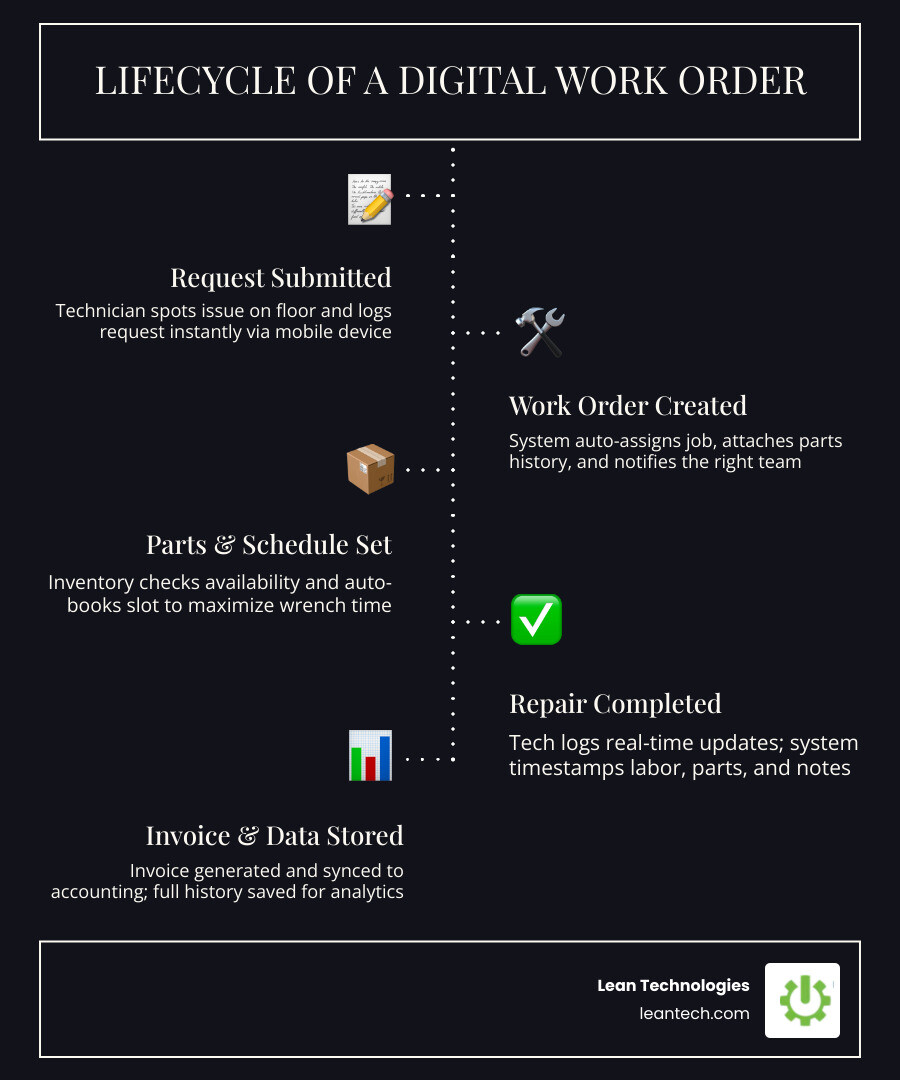
Modern maintenance shop software changes that equation. It replaces the chaos of disconnected tools with a single, visible workflow — from the moment a technician spots a problem to the moment a customer gets an invoice. Shops using purpose-built platforms have reported results like $111,300 in additional annual revenue, 15 hours saved per week, and productivity gains of 75% after making the switch.
This guide breaks down the leading features, what separates the best from the rest, and how to figure out which one actually fits your shop — without the recycled marketing claims.
The High Cost of "Paper-Based" Maintenance
Let’s talk about the "lost hour" phenomenon. It’s that hour your best tech spends walking back and forth to the front office to ask about a part, or the 20 minutes spent trying to read a grease-stained handwritten note. In a busy shop, those lost minutes add up to thousands of dollars in unbilled labor every month.
When you rely on paper or generic spreadsheets, you aren’t just being "old school"-you’re losing data. Spreadsheets are where information goes to die because they aren’t searchable, they don’t update in real-time, and they certainly don't alert you when a critical machine is due for service. For teams trying to move toward more reliable, planned upkeep, even basic computerized maintenance management system concepts beat a binder full of handwritten notes.
The shift from reactive "firefighting" to proactive uptime requires a digital backbone. Instead of waiting for a machine to smoke, maintenance shop software allows you to schedule work based on actual usage or engine hours. This transition isn't just about being organized; it's about survival. Shops using modern digital platforms report 30% faster operations because the system handles the administrative heavy lifting, letting techs get back to the wrench.
Why General ERPs Fail and Specialized Maintenance Shop Software Wins
Many manufacturing leaders try to force their maintenance team to use the company-wide ERP for work orders. It usually ends in disaster. Why? Because ERPs are built for accountants, not for people holding impact wrenches. They are clunky, require 50 clicks to close a task, and lack the specific logic needed for repair environments.
Specialized maintenance shop software bridges the gap between the front office and the shop floor. It treats Work Order History as a diagnostic tool rather than just a record of a bill. By looking at what was done six months ago, a tech can spot recurring failures that a generic tool would miss.
Furthermore, Parts Management becomes a breeze. Instead of "hoping" the part is on the shelf, specialized software tracks inventory levels in real-time and can even automate reordering.
Key Differences: Why Your Accounting Tool Isn't a Maintenance Strategy
Workflow vs. Ledger: Accounting tools track the money; shop software tracks the movement.
Technician Adoption: If a tool is too hard to use on a tablet with gloves on, your team won't use it. Specialized tools are built for the bay.
Asset Logic: Shop software understands "preventive maintenance intervals"—QuickBooks does not.
Real-Time Progress: You can see which bay is full and which tech is clocked into which job right now.
Maximizing Wrench Time with Maintenance Shop Software
The goal of any shop manager is to maximize "wrench time"—the hours actually spent fixing things. Administrative friction is the enemy. Every time a tech has to stop to do "double-entry" (writing it on paper, then typing it into a computer later), you're paying a "tax" on their productivity.
Modern digital tools allow techs to update jobs from a mobile device. This eliminates the end-of-day data entry scramble and ensures that every billable minute is captured. In fact, users of specialized shop software have seen an average daily technician productivity improvement of 1.5 hours. That’s nearly a full day of extra labor recovered every week, per technician.
Core Features of Modern Maintenance Shop Software
When you're shopping for a solution in 2026, don't get distracted by flashy UI that doesn't solve floor problems. You need a platform that handles All-in-One Equipment Maintenance & Service Management without making things more complicated.
The "Must-Have" Feature List:
Real-Time Scheduling: Drag-and-drop boards that show technician capacity and bay availability.
Digital Inspections: Templates that allow techs to snap photos of issues and send them directly to managers for instant approval.
Mobile Access: If it doesn't work on a tablet or phone, it's useless for the floor.
Preventive Maintenance (PM) Triggers: The ability to set schedules based on dates, meter readings, or mileage so nothing falls through the cracks.
Offline Capability: Essential for large plants or remote field service where Wi-Fi is spotty.
Leading platforms emphasize this all-in-one approach, ensuring that CRM, inventory, and HR are all under one roof, secured with high-level encryption.
Connecting the Shop Floor to the Back Office
Your maintenance team shouldn't be an island. The data they generate needs to flow seamlessly to the people paying the bills. Leading platforms offer deep integrations with accounting giants like QuickBooks and Xero.
When a tech finishes a job and hits "Complete," the Maintenance workflow should automatically trigger an invoice and update the inventory ledger. This prevents the "missing invoice" headache and ensures that parts used on the floor are actually paid for. Modern systems provide a two-way sync that ensures your customer data and payments are always aligned between the shop floor and the accounting office.
Boosting Productivity with Automation in Maintenance Shop Software
The biggest change in 2026 is the role of AI and automation. We're moving past simple data entry into a world where the software does the "thinking" for you.
Advanced platforms, for instance, use AI invoice parsing. You can snap a photo of a parts invoice, and the system reads every line item, tax, and discount in seconds—matching it to a purchase order automatically. This can save a typical 8-12 mechanic shop upwards of $2,000 a month just by catching pricing errors and eliminating manual entry.
Automation highlights include:
Automated Service Reminders: Text or email notifications sent to customers or fleet managers when PMs are due.
Predictive Insights: Analyzing Work Order History to predict when a specific asset is likely to fail.
Smart Scheduling: AI that suggests which technician is best suited for a job based on their past performance and current workload.
Choosing the Right Fit: Scalable Solutions for Modern Shops
Not all shops are created equal. A heavy-duty diesel shop has different needs than a plant maintenance department or an auto body shop.
Heavy Duty & Fleet: Look for software that understands DOT inspections, core tracking, and multi-day repairs.
Auto Body & General Repair: Look for platforms that focus on increasing Average Repair Order (ARO) through digital inspections and CRM follow-ups.
Industrial/Plant Floor: Focus on Equipment Asset Tracking and safety compliance across hundreds of sites.
Comparing Deployment Models
Feature Cloud-Based On-Premise Hybrid Access Anywhere with internet Local network only Local with cloud sync Updates Automatic Manual Semi-automatic Security Managed by vendor Managed by your IT Shared responsibility Cost Monthly subscription Large upfront cost Mixed
Implementation and ROI: What to Expect in 2026
The fear of a "six-month rollout" often keeps shop owners stuck on paper. However, modern maintenance shop software is designed for rapid adoption. Many shops are up and running within a week.
The Onboarding Reality:
Days 1-7: Data migration. Moving your equipment lists and customer info from Excel to a CMMS.
Days 8-14: Technician training. Getting the team comfortable with tablets.
Days 15-30: Process refinement. Setting up your custom Planned Maintenance triggers.
The ROI is usually immediate. Between capturing more billable hours and reducing emergency "firefighting" costs, most shops see the software pay for itself within the first 90 days. For example, users of integrated maintenance platforms have reported a 70% reduction in mean time to repair (MTTR) and significant annual savings—sometimes over $500k for large facilities.

Frequently Asked Questions about Maintenance Shop Software
How much does maintenance shop software typically cost in 2026?
Pricing is usually tiered based on the number of users or assets. Entry-level plans for small shops can start around $199/month, while enterprise-grade solutions for multi-location operations can range from $700 to several thousand dollars per month. Always look for "all-in" pricing that includes support and updates.
Can we migrate our existing equipment history from spreadsheets?
Yes. Most leading platforms offer free data migration services. They can take your messy Excel files and map them into the new system so you don't lose your historical data.
Does the software work offline for technicians in remote areas of the plant?
Many modern apps offer "offline mode." Technicians can complete their checklists and work orders without a connection; the data then syncs automatically once they are back in Wi-Fi range. This is a critical feature for large manufacturing plants or field service.
What to do next
Stop managing your shop floor through spreadsheets and wishful thinking. If you want faster problem-solving and real-time visibility, it’s time to digitize. Whether you are running a heavy-duty repair shop or managing a complex manufacturing plant floor, the right maintenance shop software is the difference between barely keeping up and actually getting ahead.





