

Everything You Need to Know About Maintenance Work Orders
Why Maintenance Work Orders Are the Backbone of Shop Floor Control
A maintenance work order is a formal document that authorizes, tracks, and closes a maintenance task—from the moment a problem is identified until it's resolved and documented. It tells your team what needs fixing, who's responsible, what parts are required, and when it's due.
Here's what you need to know:
A maintenance work order is NOT the same as a work request. A work request is anyone flagging a problem. A work order is the approved, prioritized task that gets assigned and tracked.
It drives accountability. Every work order should include: asset ID, problem description, assigned technician, priority level, required parts, safety notes, and completion sign-off.
It builds asset history. Every completed work order becomes data—showing you patterns, root causes, and what's eating your maintenance budget.
It only works in real time if it's digital. Paper or end-of-shift data entry means you're already behind.
If your team is still chasing down clipboards, decoding scribbled notes, or wondering who was supposed to fix that pump last Tuesday, you're not alone. Most manufacturing operations struggle with the same thing: maintenance work orders that break down before the work even starts.
The result? Missed preventive maintenance. Finger-pointing. Downtime that could've been avoided. And a maintenance backlog that never seems to shrink.
The good news? It doesn't have to be this way. When your work orders are structured, visible, and tracked in real time, your team can finally get ahead of the chaos—and start running maintenance like the profit-driving function it's supposed to be.
Start with the Pain: Why Maintenance Work Orders Break Down
Walk onto any shop floor that relies on paper, and you’ll see the same scene: a maintenance supervisor’s desk buried in coffee-stained clipboards. One guy says he told someone about the leaking hydraulic line three days ago. The technician says he never saw the paper. Meanwhile, the machine is down, and the production manager is breathing down everyone's neck.

When your maintenance work order process is manual or disjointed, you aren't just losing time—you're losing money. Unplanned downtime can cost a plant $25,000 per hour or more. Without a structured system, you face:
The "Who’s Got the Clipboard?" Mystery: Information gets trapped in pockets or lost in transit.
Missed PMs: Preventive maintenance gets pushed aside for "emergencies" because there’s no clear schedule.
Zero Accountability: If it isn't documented in real-time, did it even happen? Finger-pointing becomes the default setting.
Tribal Knowledge: Only "Old Joe" knows how to fix the conveyor, and he didn't write anything down before he retired.
This chaos creates a reactive culture. You’re always putting out fires instead of preventing them. Real-time visibility beats "real-late" data every single time. If you’re entering work order data at the end of the shift, you’re already looking in the rearview mirror.
What Is a Maintenance Work Order—and Why Does It Matter?
At its simplest, a maintenance work order is the official authorization for a task. It is the bridge between identifying a need and completing the job. But it’s more than just a "to-do" list; it's a living document that evolves as the work progresses.
Why does it matter so much? Because it serves three critical functions:
Authorization and Instruction: It gives the technician the "green light" and the blueprints. It tells them exactly what to do, which tools to grab, and which safety protocols (like LOTO) to follow.
Resource Allocation: It tracks labor hours and parts usage. This helps you manage your MRO (Maintenance, Repair, and Operations) inventory so you don't run out of critical spares.
Historical Record: It builds an asset history that is worth its weight in gold. Over time, this data reveals which machines are "lemons" and which maintenance strategies actually work.
Without a formal maintenance work order, maintenance is just a series of random acts. With it, you have a controlled, compliant, and measurable process. Digital work orders drive accountability because they leave a timestamped trail of who did what and when.
Work Request vs. Maintenance Work Order: What’s the Difference?
This is where many teams get tripped up. They treat every "hey, can you look at this?" as a work order. That’s a recipe for a bloated backlog.
Work Request: This is the "What." An operator notices a strange vibration or a flickering light and flags it. It’s an unvetted suggestion that something needs attention.
Maintenance Work Order: This is the "How, When, and Who." Once a supervisor reviews the request, approves the budget, and assigns a technician, it becomes an official work order.
By streamlining your work request process, you filter out the noise. You ensure that your skilled technicians aren't wasting time on duplicate requests or non-essential tasks while a critical asset sits idle.
How a Work Request Becomes a Work Order
The transition shouldn't be a black hole. In a lean system, the process looks like this:
Submission: Operator logs the issue via a mobile device.
Validation: The supervisor checks if the part is in stock and if the work is actually necessary.
Prioritization: The task is ranked based on asset criticality and safety risk.
Approval: The request is converted into a maintenance work order and hits the digital queue.
The 5 Core Types of Maintenance Work Orders
Not all work is created equal. Categorizing your maintenance work order types allows you to balance your workload and track where your money is going.
Type Trigger Goal Preventive (PM) Time or usage-based (e.g., every 30 days) Prevent failure before it happens. Corrective Identified during an inspection or PM Fix a known issue before it becomes a breakdown. Emergency Sudden equipment failure Restore production immediately (Reactive). Predictive Data entered by the team (e.g., high temp) Act based on actual equipment condition. Inspection Safety or compliance audit Verify the asset is in good working order.
Preventive maintenance is your bread and butter. Statistics show that facilities using digital systems for PMs complete 62% more requests daily. Meanwhile, emergency work orders are the "budget killers." They cost 3 to 10 times more than planned work due to expedited shipping and overtime.
Preventive maintenance best practices suggest a ratio of 80% planned work to 20% unplanned work. If your emergency orders are higher than that, your machines are running you—not the other way around.
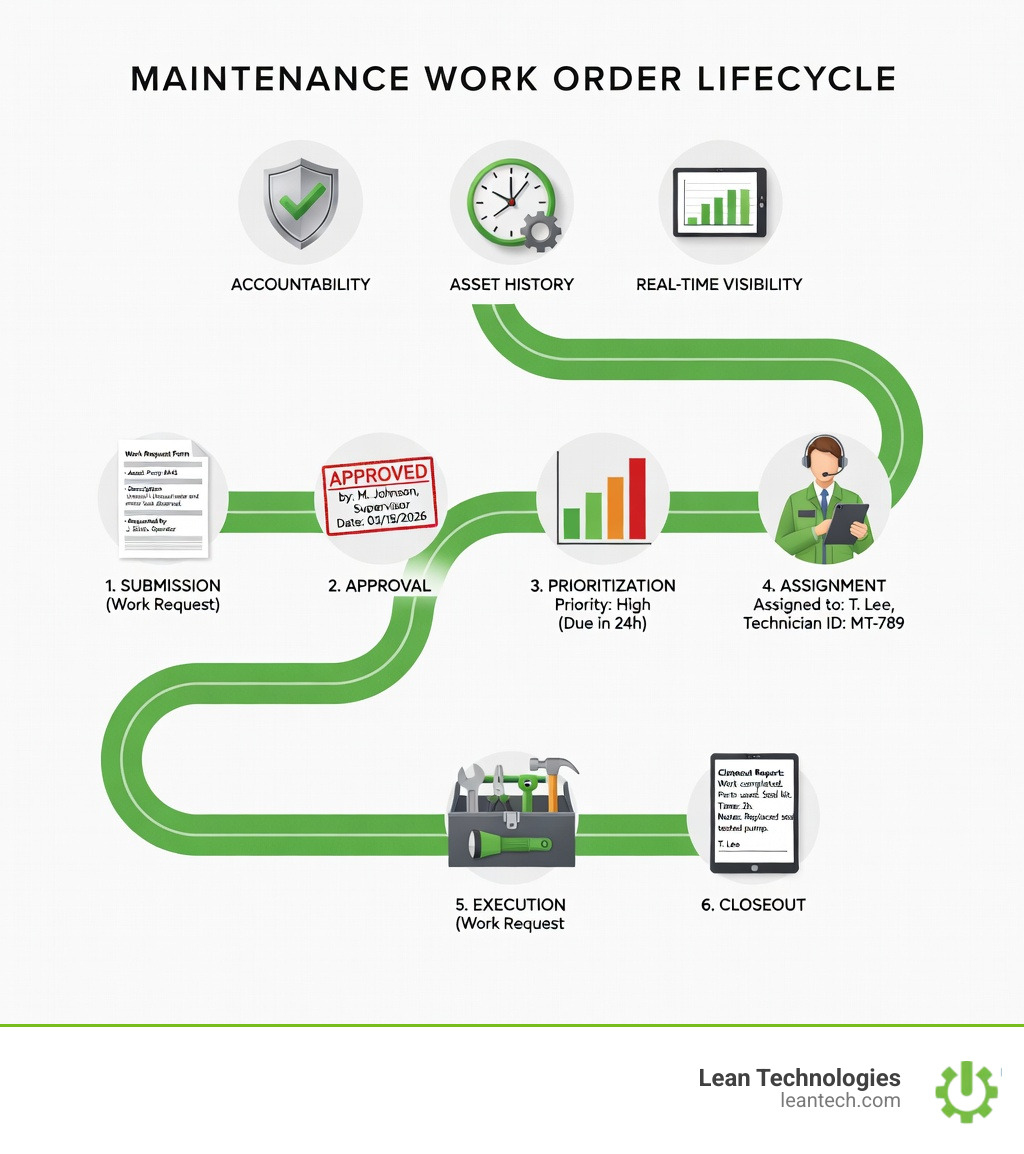
The Real-World Lifecycle of a Maintenance Work Order
A maintenance work order shouldn't just "exist"—it should move. The lifecycle is a loop that, when closed correctly, feeds into your continuous improvement (CI) efforts.
Identification: A problem is spotted or a PM trigger is hit.
Creation: A digital work order is generated with all necessary details.
Prioritization & Scheduling: The job is placed on the calendar based on urgency.
Execution: The technician performs the task, following the SOPs attached to the order.
Documentation: The tech logs their time, parts used, and takes a "job done" photo.
Closure & Review: The supervisor closes the loop.
Closing the Loop: Why Documentation Matters
If a technician fixes a machine but doesn't document the root cause, you've missed an opportunity to prevent it from happening again. Documentation kills "tribal knowledge." When the details are in the system, any technician can step in and understand the asset's history. This data is what allows you to close the loop on maintenance tasks and stop making the same mistakes twice.
What Every Effective Maintenance Work Order Needs
A vague work order is a dangerous work order. "Fix the press" is not an instruction; it’s a riddle. To be effective, every maintenance work order needs:
Asset ID & Location: Exactly which machine and where is it?
Problem Description: Detailed notes (and ideally a photo) of the issue.
Priority Level: Is this a "fix it now" or a "fix it Friday" job?
Required Parts & Tools: Don't make the tech walk back to the tool crib three times.
Labor Estimate: How long should this take? (Crucial for Mean Time to Repair metrics).
Safety Notes: LOTO requirements, PPE needed, and any hazardous material warnings.
Sign-off: A digital signature to ensure accountability.
Best Practices for Modern Work Order Management
If you want to move from "firefighting" to "world-class," you need to modernize how you handle these documents.
Go Digital: Ditch the paper. Paper is slow, it gets lost, and it’s environmentally unfriendly. Digital systems like Thrive ensure data is captured at the source.
Enable Mobile Access: Technicians should be able to update a maintenance work order while standing at the machine, not an hour later at a desk.
Standardize with SOPs: Attach checklists to your work orders. This ensures that every tech performs the PM the same way, every time.
Track Key Metrics: Use your work order data to calculate MTBF (Mean Time Between Failures) and Schedule Compliance. If you aren't measuring it, you can't improve it.
Conduct Post-Mortems: For major failures, review the work order history. What did we miss? How can we adjust the PM schedule?
By following digital lean manufacturing principles, you turn your shop floor into a transparent, data-driven environment.
Frequently Asked Questions about Maintenance Work Orders
How do you fill out a maintenance work order so nothing gets missed?
The best way is to use a digital template with "mandatory fields." If the technician can't close the order without entering the "Root Cause" or "Parts Used," the data will always be complete. Always include a checklist for standard tasks to ensure consistency.
Can maintenance work orders be automated or triggered by team input?
Yes! In a modern system, you can set up recurring work orders for PMs (e.g., every 1,000 cycles). You can also have work orders triggered by specific operator inputs, such as an "Out of Spec" quality check or a high-temperature reading logged during a shift.
What’s the difference between a work order and a purchase order?
A maintenance work order authorizes work (labor and task). A purchase order authorizes the procurement of goods or services from an outside vendor. They are not the same, though a work order may trigger a purchase order if a part is out of stock.
How do you track work order completion in real time?
Real-time tracking requires a digital dashboard. When a technician starts a job on their tablet, the supervisor sees the status change from "Pending" to "In Progress" instantly. This eliminates the need for constant radio check-ins and "status update" meetings.
What to Do Next: Stop Managing Maintenance with Spreadsheets
If you’re still using Excel to track your maintenance, you’re playing a losing game. Spreadsheets are where data goes to die. They don't give you alerts, they don't track real-time progress, and they don't hold anyone accountable.
Thrive was built by manufacturing experts who know the pain of a broken maintenance process. We help you digitize your maintenance work order flow so you can see exactly what’s happening on your shop floor right now. No more paper trails. No more "I thought you did it" moments.
Stop managing your shop floor through spreadsheets and wishful thinking. Let your team run lean with real-time visibility and fewer workarounds. When you structure your processes and capture data at the source, you don't just fix machines—you fix your bottom line.





